
1
Prepare Your Firestick
From the Fire TV home screen go to Settings → My Fire TV → About. Highlight your device name and press Select 7 times until the developer message appears.
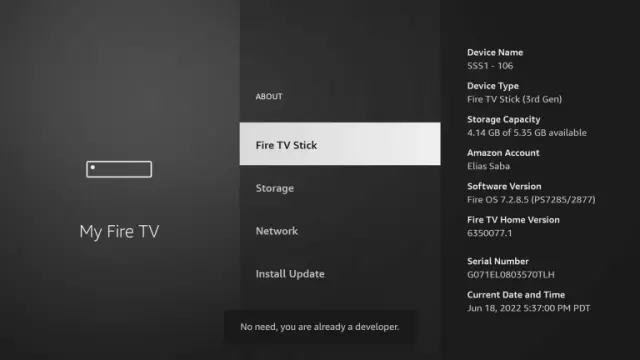
Enable developer options, install Downloader, install IboPlayer, then send us the Device ID and Device Key shown in the app.
From the Fire TV home screen go to Settings → My Fire TV → About. Highlight your device name and press Select 7 times until the developer message appears.
Search the Amazon Appstore for Downloader by AFTVnews. Install it, open it, and allow file access if prompted.
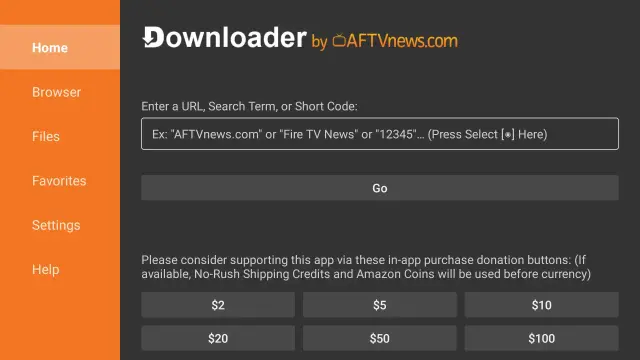
In Downloader enter the Rove app download code 1171959, select Go, install the APK, then open IboPlayer.
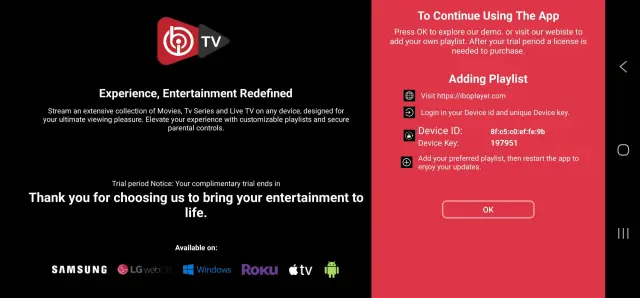
WhatsApp or email us your Device ID and Device Key, and we will upload the playlist for you.
Email: contact@roveiptv.net
WhatsApp: +1 939-888-3267